
Understanding Nutanix (NCP-MCI Prep) – Part 3
The Part Where I Realized the Practice Exam Knows Things I Thought I Knew

After another almost 10 hours of grinding through the practice exam section, I can confidently say two things:
I survived.
The exam is not impressed by vibes-based understanding.
If Part 1 was about getting the mental model right,
and Part 2 was about uncovering the hidden machinery…
Part 3 is about humility.
Because as I worked through more NCP-MCI prep questions, one uncomfortable truth became obvious:
I thought I kind of understood Nutanix.
The practice exam politely disagreed.
And yes — most of the questions I answered were wrong on the first pass.
Not because the questions were hard…
but because the details matter more than intuition.
This post is about everything that lives in that gap.
A Quick, Painful Lesson Before We Start
One hard-earned piece of advice:
Do not use AI LLMs as your primary practice exam engine.
Not because they’re dumb — but because they’re pathologically confident.
That thing is not programmed to say:
“I don’t know.”
So instead, it confidently gives you an answer that sounds plausible, well-structured, and is just wrong enough to cost you points.
It’s like studying with a friend who read half the manual, skimmed the rest, and still answers every question without hesitation.
Helpful for understanding concepts? Absolutely.
Great for mental models? Yes.
Trustworthy as a practice exam oracle?
…let’s just say it has strong opinions and loose facts.
Ask me how I know.

Alright — jokes aside. Let’s roll.
Cluster Management: Where Precision Starts to Matter
Early in the blueprint, you hit cluster management, and it feels deceptively simple.
Until it isn’t.
This section is where the exam starts testing terminology, behavior, and order of operations.
The Cluster Virtual IP (VIP)
At first glance, the Cluster VIP feels like a convenience feature.
It’s not.
The VIP:
is shared across the entire cluster
allows access to Prism Element even if individual nodes are unavailable
works for UI and API access
is often called:
Clustered Virtual IP
Virtual IP
VIP
All interchangeable. All fair game on the exam.
Key behavior to remember:
If the cluster is up, at least one CVM will answer the VIP.
That’s what the exam is testing.
Data Services IP (DSIP)
This one gets people.
The Data Services IP (also called DSIP or iSCSI Data Services IP) is not “optional fluff.”
It’s required for:
iSCSI access
Calm
Leap
Objects
Files
basically anything that wants to consume AOS data services externally
Mental translation for exam questions:
“The IP clients use to talk to AOS data services.”
Time Is a Feature (NTP Is Not Optional)
NTP feels boring — which is exactly why it shows up on exams.
Best practice (and tested):
configure multiple NTP servers (five is recommended)
ensure all components use the same time source
keep logs aligned across:
CVMs
hosts
Prism Central
Why?
Because distributed systems break in weird ways when time drifts.
The exam expects you to treat time as infrastructure.
Redundancy Factor vs Fault Tolerance (This One’s Subtle)
This is one of those “I know this… wait… do I?” moments.
Redundancy Factor (RF) = how many copies of data / services exist
Fault Tolerance (FT) = how many failures you can survive
The relationship:
RF2 → FT1
RF3 → FT2
Default behavior:
Any cluster with 3 or more nodes defaults to RF2
RF3 requires at least 5 nodes
The exam will happily swap terminology mid-question.
They expect you to translate.
Replication Factor 1 (RF1): The Checkbox That Matters
RF1 is not something you casually enable per container.
Key rule:
RF1 must be enabled at the cluster level first.
Only then can you create RF1 containers.
This shows up constantly in “what must be done first?” questions.
Syslog: GUI vs CLI Is a One-Way Door
Another easy-to-miss detail.
Configure syslog in Prism Central GUI
→ pushed to Prism Central and all managed clustersConfigure syslog via CLI
→ now you own it everywhere, manually
Exam trap:
Once you go CLI, you stay CLI.
The exam loves this distinction.
🔧 Lifecycle Management (LCM): The Section the Exam Really Cares About
If there is one area where the exam asks a disproportionate number of questions, it’s LCM.
And not “what does LCM do?” questions — but where it lives, how it behaves, and what it uses under the hood.
Where LCM Lives
LCM is accessed through Admin Center in Prism Central.
Why?
Because LCM is a platform administration function, not a day-to-day infrastructure operation.
If it:
upgrades AOS
upgrades AHV
upgrades firmware
upgrades BIOS/BMC
…it lives in Admin Center.
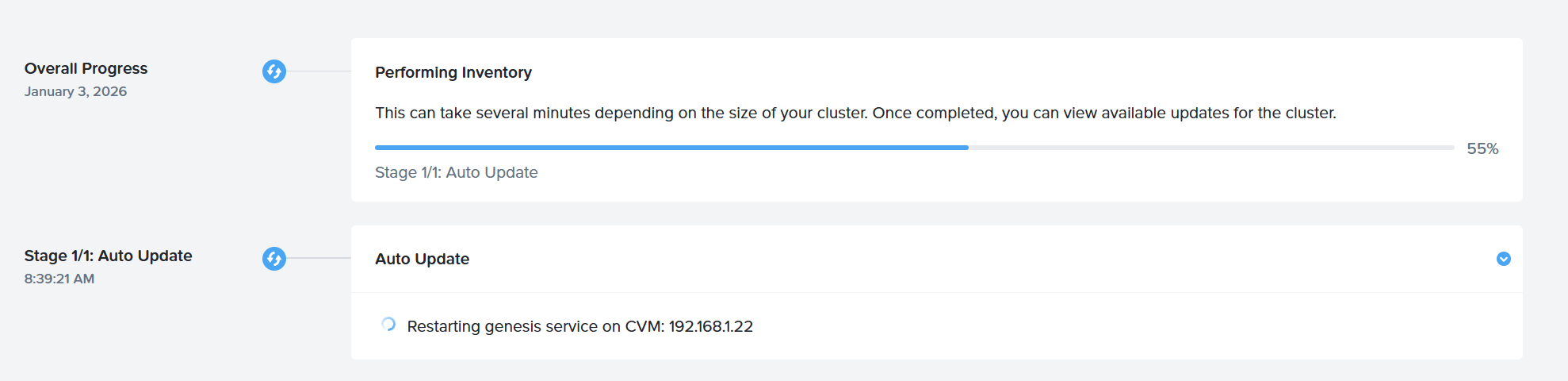
What LCM Manages
LCM handles:
AOS
AHV
firmware
BIOS
BMC
supported hardware components
And it does so in a coordinated, dependency-aware way.
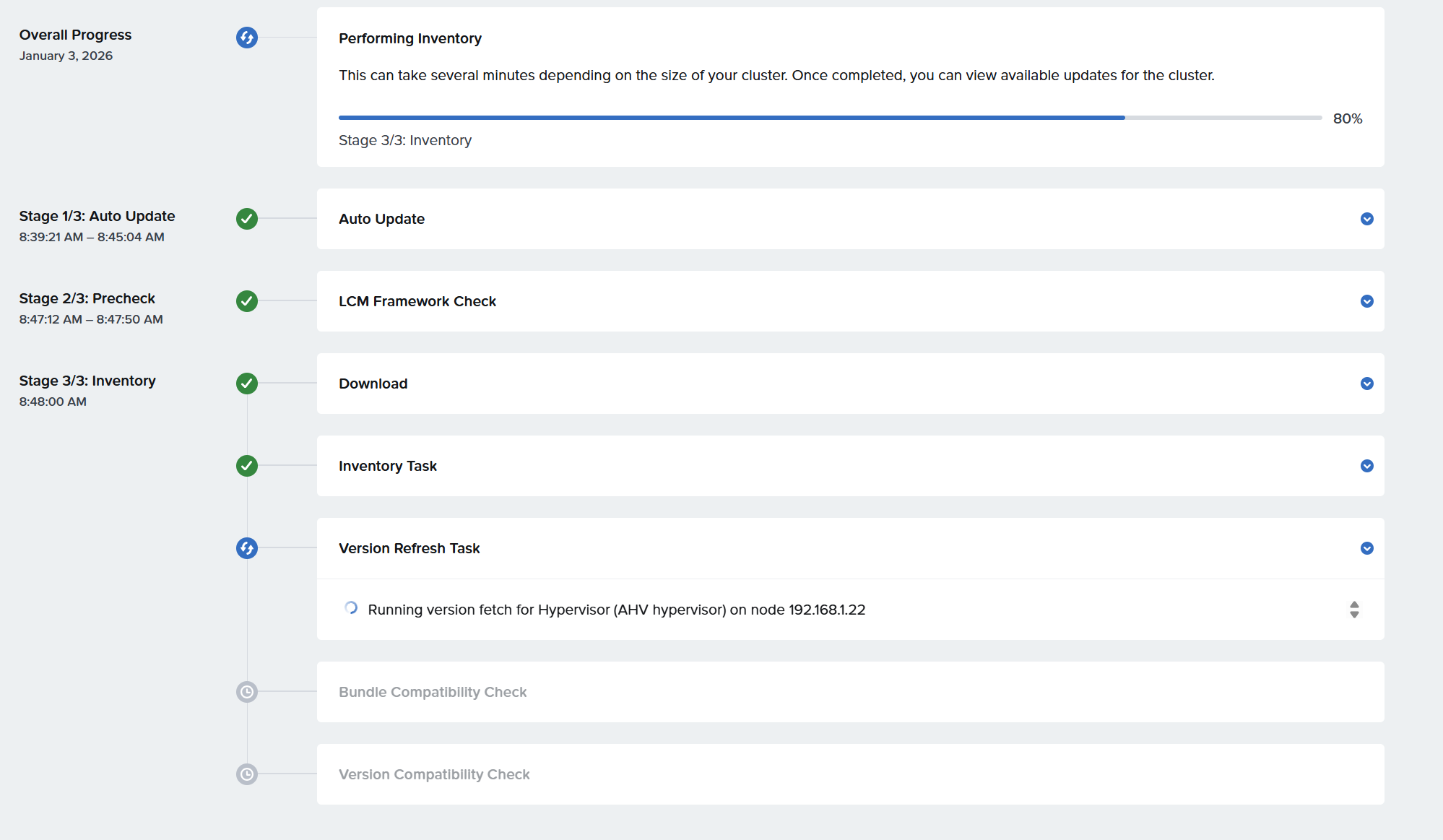
In my CE instance it even updated itself from version 3.0 to 3.3. It’s like magic.
How LCM Performs Hardware Updates
This is a classic exam question.
LCM uses:
Redfish
Not IPMI.
Not SSH.
Not SNMP.
Redfish is the protocol used for BMC and BIOS updates.
If you see Redfish in an answer choice — your ears should perk up.
Why LCM Questions Are Tricky
Because the exam mixes:
UI navigation
protocol knowledge
scope (cluster vs multi-cluster)
LCM is where “I’ve done this before” stops being enough.
Security: The Stuff You Don’t Click in the UI
Some security features live entirely outside the GUI.
The Nutanix platform and all products leverage the Security Configuration Management Automation (SCMA) framework to ensure that services are constantly inspected for variance to the security policy. SCMA checks multiple security entities for both Nutanix storage and AHV, automatically reports and logs inconsistencies, and then reverts entities to the baseline as needed.
With SCMA, you can schedule the STIG to run hourly, daily, weekly, or monthly. Running the STIG does not affect system performance since it has the lowest system priority within the virtual storage controller, allowing you to run checks as frequently as your company policies require.
AIDE - Advanced Intrusion Detection Environment — a file integrity monitoring tool
STIG - Security Technical Implementation Guides
SCMA - Security Configuration Management Automation
AIDE
takes system snapshots
tracks hashes and modification times
detects configuration drift
SCAP / STIG Automation
enforces security baselines
uses machine-readable controls
Both are:
configured from the CVM
scheduled
part of serious hardening stories
You don’t need to tune them — but you do need to know they exist and where they live.
App Discovery: Why the Cloud Is Involved
This one tripped me up early.
App Discovery:
analyzes traffic patterns
identifies applications
maps dependencies
But it requires:
a SaaS component
an API key
cloud-based analytics
The exam is testing whether you understand why:
Local telemetry + cloud intelligence = better application identification
Not data exfiltration.
Not licensing enforcement.
Just smarter analysis.
Networking: Where Most People Lose Points
This is where the exam stops being forgiving.
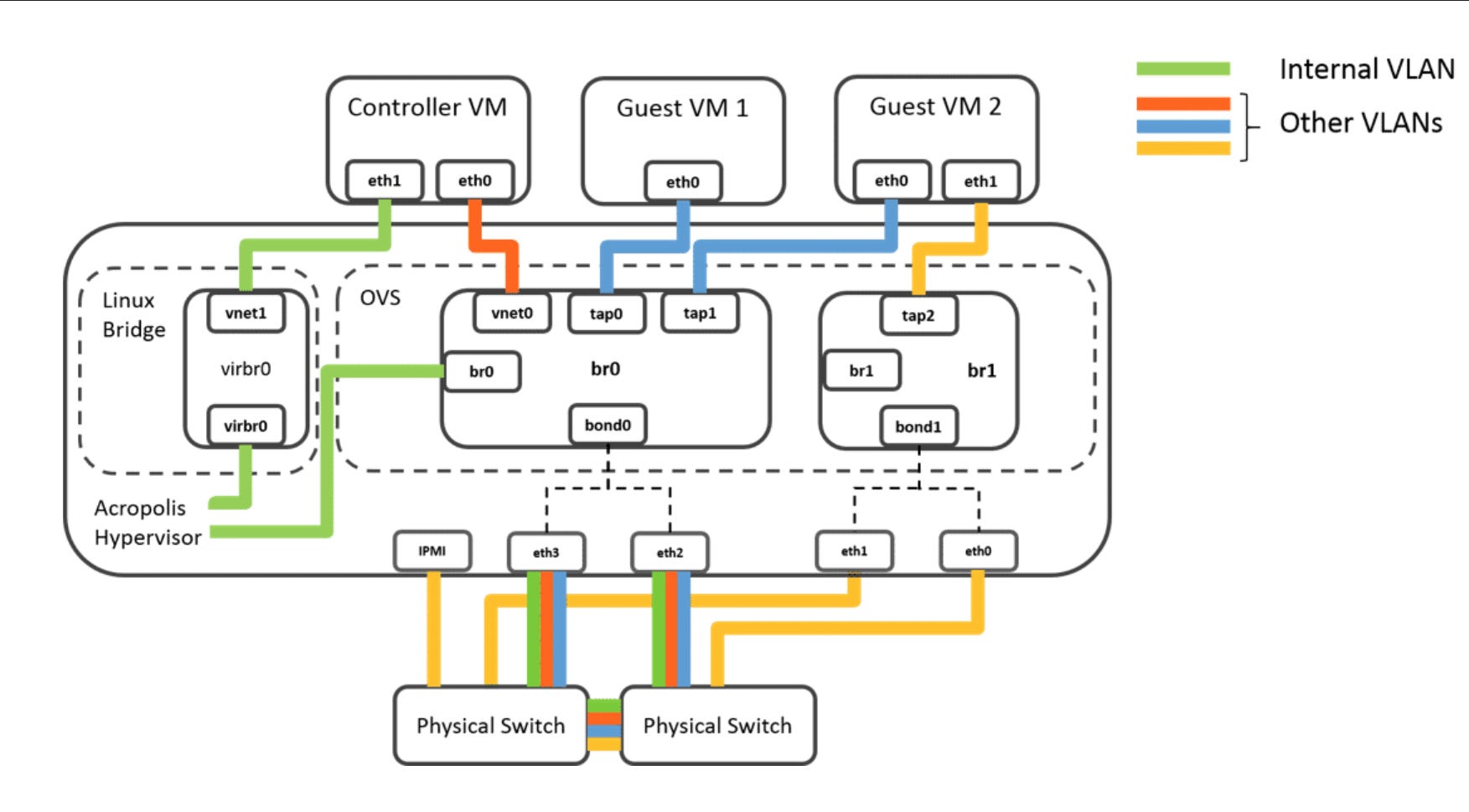
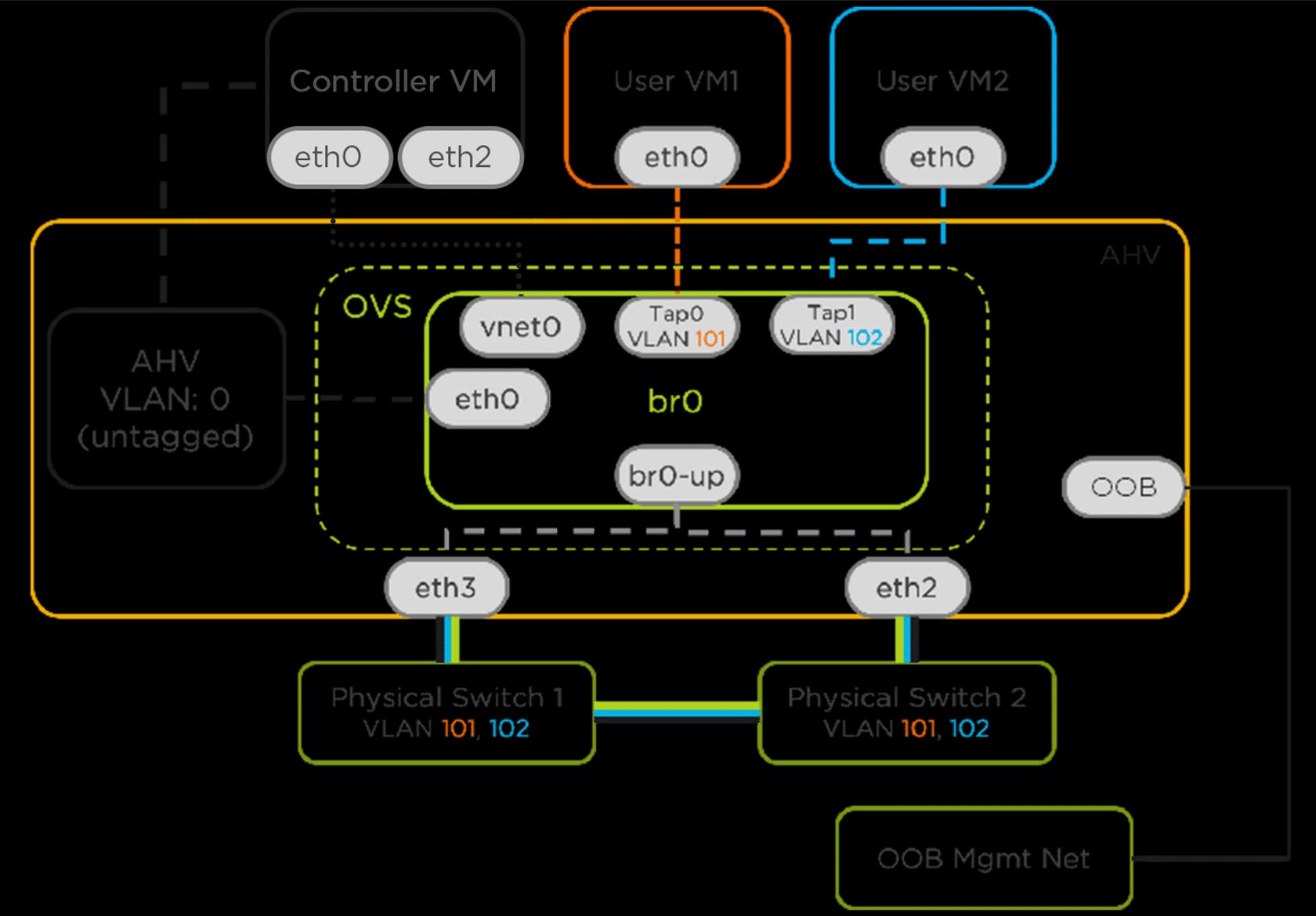
Open vSwitch (OVS)
AHV uses Open vSwitch.
Default:
br0/vSwitch0shared across hosts
all VMs see the same networks
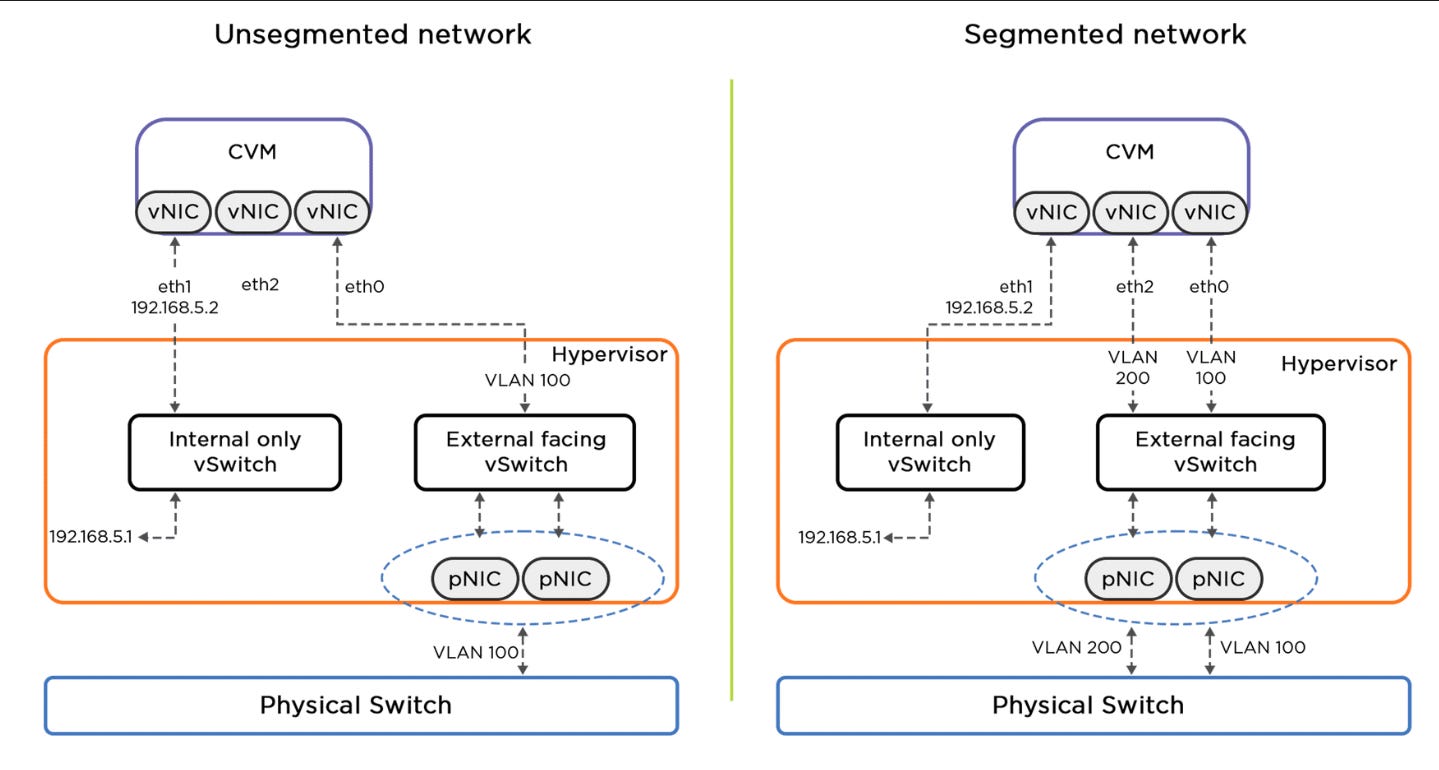
CVM Networking (The 192.168.5.0/24 World)
Every host has:
Hypervisor:
.1CVM:
.2Local access even if external networking is broken
This is your lifeline when things go sideways.
Subnets, VLANs, and “Managed Networks”
In the UI:
you create a subnet
you optionally enable IPAM
In exam language:
IPAM enabled = Managed Network
IPAM disabled = Unmanaged Network
Same object. Different terminology.
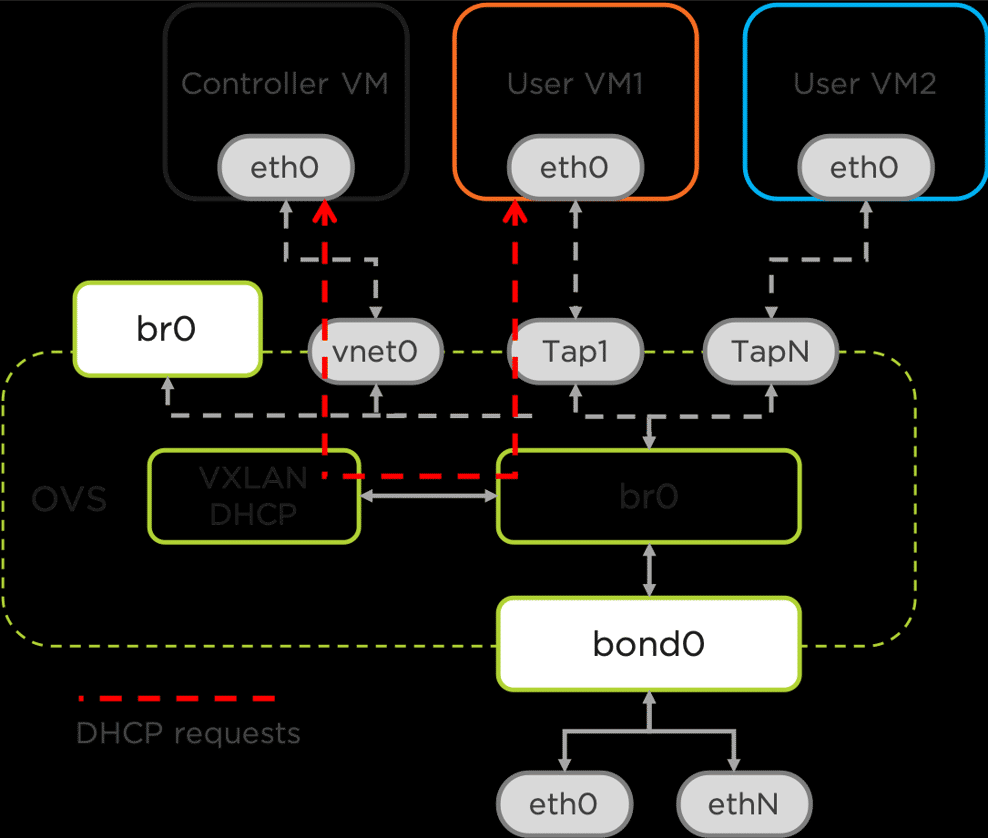
If IPAM is enabled:
Nutanix answers DHCP
IPs come from the defined pool
If not:
DHCP comes from the external network
Virtual Switches: Power With Consequences
You can create additional virtual switches — but:
A VM can only run on hosts that have that switch.
That limits placement.
The exam will test whether you understand the tradeoff, not whether you know how to click the button.
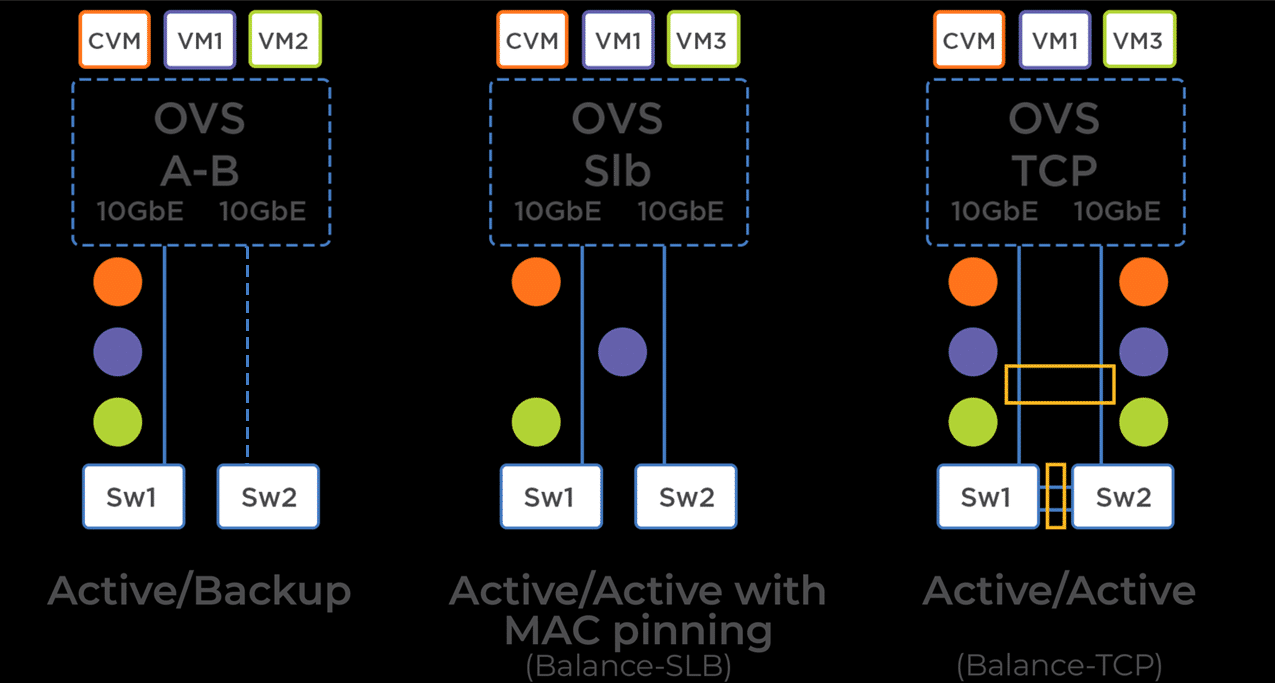
Bond Modes (Yes, You Have to Memorize These)
Three modes. All tested.
Active / Backup
one NIC active
others standby
no performance drop on failure
Balanced SLB (MAC pinning)
traffic spread across NICs
no switch config required
performance drops on failure
Balanced TCP (Active / Active, LACP)
highest performance
requires switch config
multiple sessions per VM across NICs
If the question mentions LACP, you already know the answer.
VM Creation & Management: “I Know How to Create a VM” Is Not Enough
This section is where the exam quietly checks whether you understand what Nutanix actually tracks vs what it regenerates.
VM Creation Basics (What the Exam Assumes You Know)
When creating a VM, you define:
vCPU configuration
memory
disks
NICs / networks
boot mode (BIOS vs UEFI)
That part is easy.
The exam isn’t testing how fast you can do this — it’s testing what persists and what doesn’t.
Templates vs Clones vs Snapshots (This Comes Up a Lot)
VM Templates
Capture configuration and intent
Copy:
CPU
memory
disks
NIC layout
Categories
Do not copy:
UUID
MAC addresses
IP addresses
runtime state
Mental model:
Templates copy what the VM is, not who it is.
VM Clones
Create a new VM based on an existing one
New identity is generated
Often used for rapid duplication
Snapshots
Capture point-in-time state
Used for rollback and recovery
Do not create new deployable objects
If the question asks:
“Which attributes are copied?”
Think template = config + policy, not identity.
Maintenance Mode & VM Behavior (A Sneaky One)
When a host enters maintenance mode:
User VMs are live migrated
CVMs are handled separately
VMs with host affinity or pinning:
cannot migrate
will be powered off
This explains those exam questions where:
“Most VMs migrated, but some powered off.”
It’s not a failure — it’s policy enforcement.
Categories: Tags That Actually Matter
Categories are often dismissed as “just tags.”
That’s a mistake — and the exam knows it.
Categories are:
policy primitives
inherited by templates
used for:
placement
affinity / anti-affinity
automation
governance
reporting
The shift Nutanix makes:
Not where does this VM live — but what is this VM?
Once you internalize that, Categories stop being metadata and start being control surfaces.
Exam hint:
If a question mentions policy, grouping, or automation, Categories are probably involved.
Projects: Where Governance Quietly Happens
Projects don’t show up much in day-to-day operations — which is exactly why they show up on the exam.
Projects are used to:
group VMs and resources
enforce quotas
define ownership
apply RBAC boundaries
Projects answer questions like:
Who owns this workload?
How much can they consume?
What can they deploy?
Projects are not about performance.
They are about control and accountability.
If the question smells like:
“Prevent sprawl”
“Limit consumption”
“Delegate responsibility”
You’re probably in Projects territory.
Images: Small Section, Big Exam Presence
Images are another “sounds obvious” topic that the exam sneaks into scenario questions.
Images are used to:
deploy VMs
build templates
standardize OS installs
Images can be:
ISO files
disk images
Key behaviors the exam tests:
Images are shared resources
Managed centrally
Used repeatedly for consistent builds
If the question asks:
“How do you ensure consistent OS deployment?”
Images are part of the answer.
The Real Lesson (And Why I’m Writing This)
The NCP-MCI exam isn’t testing whether you’ve used Nutanix.
It’s testing whether you understand:
where things live
why they exist
what happens first
and what breaks quietly
I got plenty wrong before I got it right.
That’s the point.
If this post saves you even a few “wait… why was that wrong?” moments — then it’s doing its job.
— Dmitry
#dmitrywashere